What’s a Vector Store? (And Why Your Website’s Chatbot Needs One)
A plain-English guide to vector stores: how AI chat can search your business documents by meaning — and answer customers from your content, with sources.

If you’ve experimented with AI chatbots for your business, you’ve probably run into the problem that keeps most of them off serious websites: they make things up. Ask a generic chatbot for your opening hours and it will cheerfully invent some. Ask about your returns policy and it will describe a policy you don’t have, in a confident tone your customers have no reason to doubt.
This isn’t a bug that better AI models will simply grow out of. It’s a consequence of what these models are: they’ve read a huge slice of the internet, but they have never read your business. The fix isn’t a smarter model. It’s giving the model your actual information at the moment it answers — and that’s where vector stores come in.
The open-book exam
Here’s the mental model we use constantly while building AnswerRails: a closed-book exam versus an open-book exam.
A generic chatbot sits a closed-book exam about your business. It has general knowledge and a lot of confidence, so it writes something — and something is often wrong.
A grounded chatbot sits an open-book exam. Before it answers, it’s handed the relevant pages from your own documents — your FAQ, your product notes, your policies — and instructed to answer from those pages. If the pages don’t contain the answer, it should say so and offer to connect the customer with a human, rather than guessing.
We see this daily on our own demo site, Celtic3d, which sells 3D-printed Scottish clan crests. Ask the assistant “Which clan is the surname Bain associated with?” and it answers from a clan-name reference document we loaded into its knowledge base — Clan MacKay, as it happens — and cites the document it used. No guessing, and the customer can see where the answer came from.
But this raises the practical question the whole approach depends on: out of everything in your knowledge base, how does the system find the right pages to hand over?
Finding the right page: why ordinary search isn’t enough
The obvious answer is keyword search — the kind of matching that powers a basic site search box. It works, and (as you’ll see below) we use it too. But it has a well-known weakness: people don’t use your words.
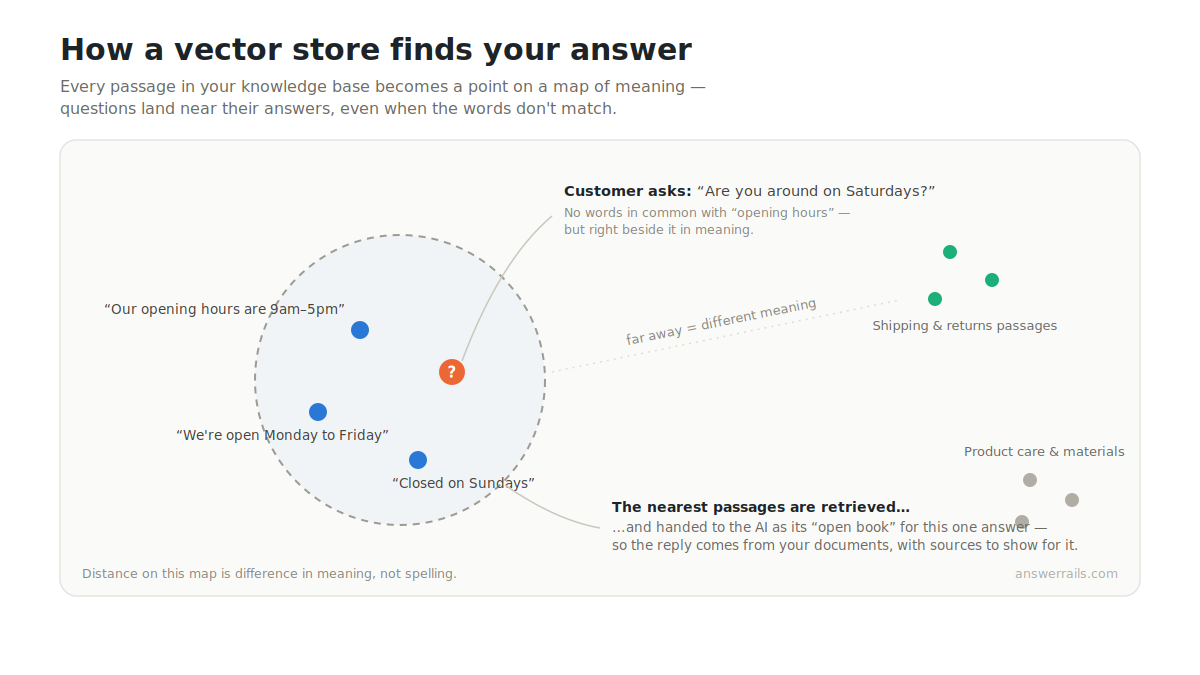
Your FAQ says “opening hours”. Your customer types “when are you open?” or “what time do you shut?” or “are you around on Saturdays?” — three questions that share almost no words with the document that answers them. Keyword search matches letters, not meaning, and meaning is what customers actually type.
So what is a vector store?
A vector store is a database built to search by meaning instead of by matching words.
The idea sounds stranger than it is. Modern AI systems can convert a piece of text into a long list of numbers — called a vector, or an embedding — that acts like a set of coordinates. Not coordinates on a geographic map, but on a kind of map of meaning. Passages that mean similar things end up close together on that map, even when they use completely different words. “Our opening hours are 9 to 5” and “what time are you open?” land near each other. “Our opening hours” and “opening a jammed sporran clasp” do not, despite sharing a word.
A vector store holds those coordinates for every passage in your knowledge base. When a customer asks a question, the question is converted to coordinates the same way, and the store finds the passages sitting nearest to it on the meaning map. Those passages — usually just a handful of short excerpts — are what gets handed to the AI as its open book for that one answer.
That’s the whole trick. No magic, just geometry: represent meaning as position, then “which documents are relevant?” becomes “which points are nearby?” — a question computers are extremely good at.
How AnswerRails puts this to work
When you add documents to the AnswerRails knowledge base — FAQs, product information, policies, even existing pages from your site — the content is broken into digestible passages and indexed for search. Then, on every single question a visitor asks:
- The question is searched against your knowledge base.
- The most relevant excerpts are retrieved — only the passages that relate to this specific question.
- The AI writes its answer from those excerpts, and the reply shows its sources, so both you and your customer can see which document the answer came from.
- If the search comes back empty-handed — the question is about something your knowledge base doesn’t cover — guardrails step in and the assistant offers to hand the conversation to your team instead of improvising.
That last step matters as much as the first three. An honest “let me connect you with someone” is a good customer experience. A fabricated returns policy is a liability.
A lesson from the workshop: don’t bet everything on one search engine
Here’s a story from our own development log. Earlier this summer, the cloud vector-search service we relied on had an intermittent outage. Our chat kept working — but with knowledge search failing, answerable questions were being handed off to a human unnecessarily. The assistant was being honest, which is exactly what guardrails are for, but it was honest more often than it needed to be.
Our response shaped the product. AnswerRails now keeps a second, independent search index of your knowledge base — a keyword index stored in your own WordPress database. If the cloud vector search ever fails, the assistant automatically falls back to searching locally, and answers stay grounded in your content instead of everything routing to your inbox. The dashboard tells you honestly when this is happening.
And in our latest release we went a step further: that local index is now a fully supported mode in its own right. On our free tier you don’t need a vector-store account at all — your knowledge base is indexed and searched entirely within your own WordPress database. Keyword search is less clever than vector search (it matches words, not meaning), which is why vector search remains the recommended upgrade — but both modes are grounded: every answer is built from your documents, with sources, or honestly handed off.
Where does my data live?
A fair question, and one we think deserves a plain answer. Your knowledge base is stored and searched in your own WordPress database — and if you enable vector search, also in a vector store on your own account with your AI provider, not ours. When a customer asks a question, only the excerpts relevant to that question are shared with your chosen AI provider so it can write the answer. You bring your own API key, so the relationship — and the bill — is directly between you and your provider.
What to take away
If you’re evaluating an AI assistant for your website, the technology behind the buzzwords boils down to three questions worth asking of any product:
Does it answer from your documents rather than its general knowledge? Does it show its sources, so answers can be checked? And when it doesn’t know, does it say so and hand over to a human?
Vector stores are the machinery that makes the first of those work well — search that understands “are you around on Saturdays?” is the same question as “opening hours”. The rest is engineering discipline: grounding, citations, guardrails, and a fallback for the days the cloud has a bad morning.
That’s what we’re building with AnswerRails. In future posts we’ll dig into other pieces of the machinery — how citations work, what “guardrails” actually means in practice, and why we think an AI assistant should tell you when it’s having a bad day.
AnswerRails is an AI customer-service assistant for WordPress, built around grounded answers, real citations, and honest handoffs. Follow along as we build it at answerrails.com.